
The Hidden Challenges Sellers Face When Listing on Mercado Libre Global
ONE, if you already have inventory sitting in the Envio Full in Mexico, it cannot be used to transfer to ML GSP. At least 50% of the sales on ML GSP are likely to come from Mexico so, this should be a no-brainer. The inventory has already been cleared (or nationalized as they say in Mexico) so, selling in Mexico is fine. For the remaining 50%, given ML's extensive logistics network in LATAM, it should also be a no-brainer to ship to the other four countries that are part of the program - Brazil, Argentina, Chile, and Colombia.
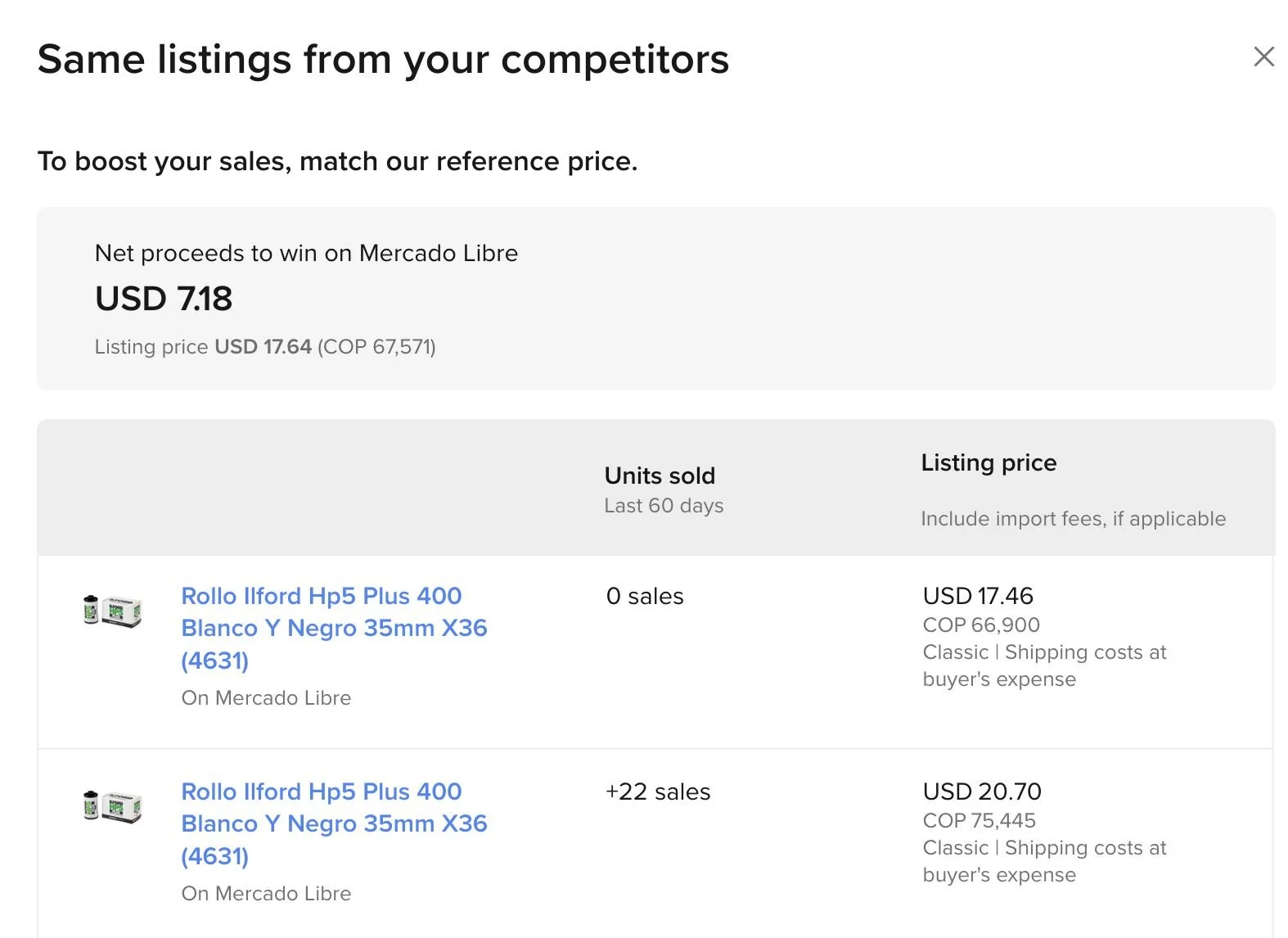
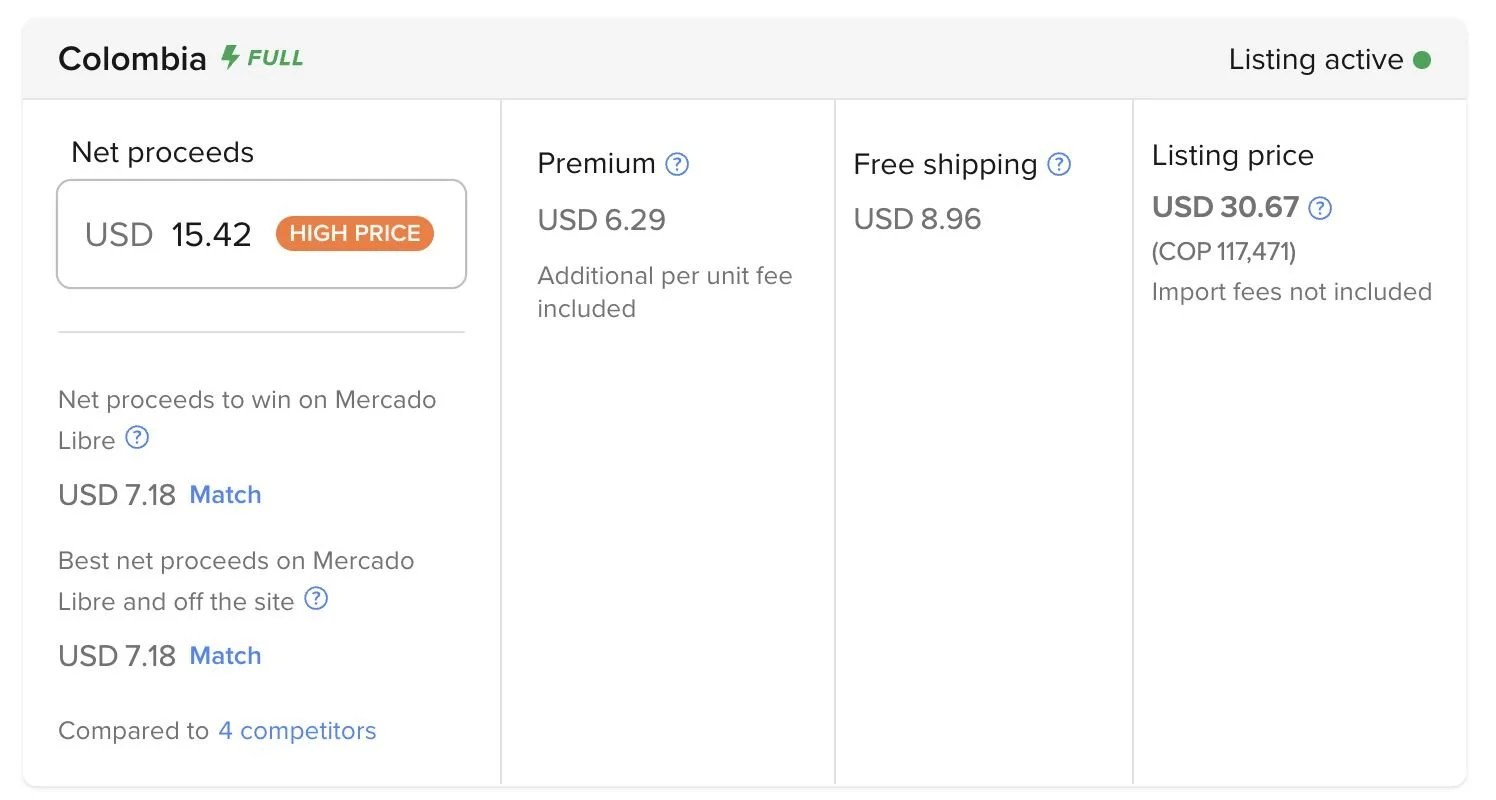
TWO, when you create your multi-country listing, it does not do an apples to apples comparison for product listing and determining who the winner is. In the attached screenshot, you can see my listing has free shipping included but, it compares pricing to the competitor who charges the buyer for shipping and then concludes that my pricing is higher.
CALCULATION: My listing price USD 30.67 compared to competitor USD 20.70. My listing includes free shipping of USD 8.96. If we take that out of the equation, 30.67-8.96=21.71 is still higher than USD 20.70 by USD 1.01. But, the system suggests that I set the net proceeds down to 7.18 from 15.42. If you accept that suggestion, it doesn't remove the free shipping thereby having you incur a loss of $8.96 per each unit sold.
THREE, when you create a listing, it doesn't give you an option whether to create a classic format listing or a premium format listing through the web interface. Apparently, according to support, the only way to control that is to go through the rocket-science level complex process of downloading an Excel worksheet with all the fields, enter the information, and then upload the worksheet. Yes, I kid you not! This is 2026 and legacy computing methodology thrives! In all fairness, Amazon also LOVES worksheet downloads and uploads. When all else fails, support will insist that is the only way to correct a problem. And good luck if you don't have the links to the images you use in the listings as you need to insert those in the worksheet.
BTW, for reasons not truly known, Argentina listings are automatically created in classic mode while Mexico, Brazil, Chile, and Colombia are automatically created in premium mode.
FOUR, and read this one slowly. To sink in. Go slow. Ok?
I have listings in Mexico ML using their Envio Full program. When creating listings in the ML GSP, it compares prices to listings including your own Mexico listings and concluding that your pricing is not competitive 😬 when comparing your global pricing to your MX only pricing. Since they cannot transfer inventory (see point #1 in prior post), I guess the efficient answer is to sell out the MX inventory, then re-assess the global pricing and adjust as necessary.
CONCLUSION
All-in-all, ML continues to offer cleaner solutions, or I should say, simpler, easy-to-use interface to the global platform. Compared to Amazon Seller Central, it is a refreshing change. The unfortunate part is that you can tell that the ML team developing these solutions have little to no experience in selling cross-border or in-depth experience in ecommerce selling. Which is understandable. Looking at the fine, clean UX, I can tell that these are some talented folks. What is non-excusable is that ML would not hire or engage a team of real-world sellers to work with the development team in expressing their pie-in-the-sky cross-border selling platform, be happy to test it, all under the stewardship of someone that can balance both teams and serve the sellers well.
ML, be real in the expectations you are setting. Your platform should have a banner that clearly states that it is in beta stage. Google did that for a couple of generations and users understood. Folks knew what they were getting into. They walked in with expectations deflated/realistic.
#mercadolibre #mercadolivre #mercadolibreglobal